

ALTR Biometric SDK
The ALTR Biometric SDK lets your web application require a live face check before a user takes a sensitive action. ALTR hosts the consent screen, camera, and capture in a frame embedded in your page, so your application contains no camera code. ALTR stores only an obfuscated representation of each enrolled face, never the captured image.
Contact ALTR to enable the SDK for your organization.
Architecture
Section titled “Architecture”The SDK has two modules: a Node.js server module that holds your secret key, and a browser module that holds no credentials.
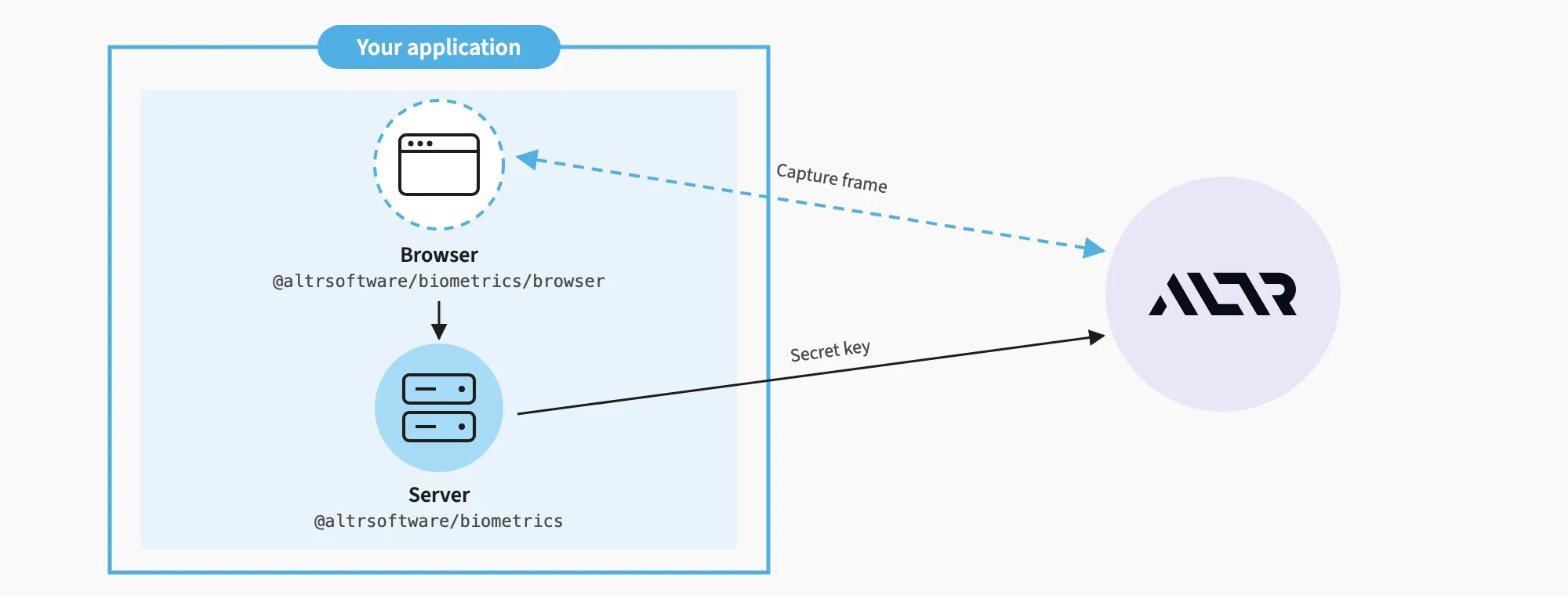
Your server mounts the session handler from the SDK, which creates a session with ALTR for the signed-in user. The browser module gets a session from that handler, opens the ALTR capture frame, then asks your server for the result. Your page’s JavaScript never receives the video or captured images.
Staging, Live, and the Biometric SDK Console
Section titled “Staging, Live, and the Biometric SDK Console”Each organization gets two environments, a live one and a staging one. Each environment is its own application, with its own URL, keys, Allowed Origins, users, and enrollments:
| Environment | Application URL (baseUrl) |
Secret key |
|---|---|---|
| Staging | https://<YOUR_COMPANY>-staging.altr-biometrics.com |
sk_staging_... |
| Live | https://<YOUR_COMPANY>.altr-biometrics.com |
sk_live_... |
You manage both in the Biometric SDK console at https://<YOUR_COMPANY>.altr-biometrics.com. This console is separate from the ALTR console (ALTRNet) and has its own sign-in: when ALTR enables the SDK, your organization’s owner receives an email invitation to set a password (the link expires after 7 days; ask ALTR to resend it), and can then invite other administrators. Both applications are listed under Applications.
Integrate against staging, then switch baseUrl and the secret key to the live application. Nothing carries over between the two: create a secret key and set Allowed Origins on each one you use.
Prerequisites
Section titled “Prerequisites”- Node.js 20.19 or later on the 20 line, 22.12 or later on the 22 line, or 23 and later.
- The URL of the application you integrate against, staging first. Set
baseUrlto it; it must behttpsexcept onlocalhostand other local addresses. - A secret key for each application you use (
sk_staging_...orsk_live_...). In the Biometric SDK console, open the application under Applications and click Create Secret Key. Only your organization’s owner can create keys. The console shows the key once. Keep it on your server. - Your page’s origin, such as
https://app.example.com, in the application’s Allowed Origins list. ALTR does not open the capture frame on any other origin. - HTTPS for your page in production. Browsers block the camera on non-secure origins;
http://localhostis exempt. - Users who are already signed in to your application.
- If your page sets a Content Security Policy (CSP), allow the ALTR origin in
script-srcandframe-src. If it sets aPermissions-Policyheader, allowcamerafor the ALTR origin.
Install
Section titled “Install”ALTR publishes the SDK as a private package on GitHub Packages. Contact ALTR with your GitHub username to get read access.
To install the SDK:
-
Create a personal access token (classic) with only the
read:packagesscope, and store it in an environment variable namedALTR_PACKAGES_TOKEN. GitHub Packages does not accept fine-grained tokens. -
Add the registry to your project’s
.npmrc:@altrsoftware:registry=https://npm.pkg.github.com//npm.pkg.github.com/:_authToken=${ALTR_PACKAGES_TOKEN} -
Install the package:
Terminal window npm install @altrsoftware/biometrics
Import @altrsoftware/biometrics only in server code, and @altrsoftware/biometrics/browser in your page. Every npm install needs the token, including CI and Docker builds. In GitHub Actions, store the token as a secret and pass it to the install step as ALTR_PACKAGES_TOKEN.
To add a face check to your application:
-
Mount the session handler on your server.
subjectreturns the signed-in user’s email address from your own authentication.import { Altr } from '@altrsoftware/biometrics'const altr = new Altr({secretKey: process.env.ALTR_SECRET_KEY,baseUrl: 'https://<YOUR_COMPANY>-staging.altr-biometrics.com', // live: https://<YOUR_COMPANY>.altr-biometrics.com})app.use('/altr', altr.express({subject: (req) => req.user?.email,})) -
Run the check from your page.
import { runAltrVerify } from '@altrsoftware/biometrics/browser'const { verified, session } = await runAltrVerify({ mount: '/altr' })if (verified) {// send session.id to the server that performs the action}verifiedcomes from your server’s read of the session. When it isfalse,statussays why:'failed'(face match or liveness check),'canceled'or'consent_declined'(the person stopped), or'refused'(usually an origin missing from Allowed Origins). -
Confirm the session on your server before it performs the action, because a user can call your action endpoint directly:
app.post('/transfers', async (req, res) => {const session = await altr.verificationSessions.retrieve(req.body.altr_session_id)if (session.status !== 'verified' ||session.flow !== 'verify' || // a first check only enrolls; nothing was comparedsession.subject_email !== req.user?.email) return res.sendStatus(403)await altr.verificationSessions.consume(session.id, { idempotency_key: req.body.transfer_id })// perform the transferres.sendStatus(204)})consumespends the session once, keyed to the action, so one face check cannot authorize two transfers. It throwsalready_consumedfor a different key.
Other Node.js Frameworks
Section titled “Other Node.js Frameworks”For Next.js route handlers on the Node.js runtime, or any framework built on the standard Request and Response, use altr.fetchHandler:
const handler = altr.fetchHandler({  mount: '/api/altr',  subject: async (request) => (await getSession(request))?.email,})
export { handler as GET, handler as POST }
getSession is your own session lookup. The page then calls runAltrVerify({ mount: '/api/altr' }).
For AWS Lambda, node:http, or other frameworks, altr.sessionHandler({ subject }) returns a function you call from your own route with { method, path }, where path is relative to your mount. Send the body it resolves to as JSON with the returned status and cache-control: no-store.
Enrollment
Section titled “Enrollment”A user’s first check enrolls their face, and each later check compares against it. An enrollment compares nothing: flow is 'enroll' and verified is true once the face is stored. That is why step 3 refuses flow: 'enroll'; on the page, run the check again when flow is 'enroll'. To choose explicitly, set mode: 'verify' or mode: 'enroll' on the handler.
To enroll only users your administrators added, turn on Only enroll users added here for the application in the Biometric SDK console, then add users under Manage Users. Anyone else is refused with subject_not_registered.
Enrollments are per application: nothing enrolled in staging carries over to live.
Error Handling
Section titled “Error Handling”runAltrVerify rejects with an AltrVerifyError when the check cannot run. Branch on code, and log toSafeString() rather than message.
code |
Cause |
|---|---|
invalid_config |
The options are invalid, such as a missing mount. |
script_load_failed |
The capture script did not load. Check your CSP and network. |
frame_unreachable |
The frame did not answer within 15 seconds. Check that your CSP allows the ALTR origin in frame-src. |
session_request_failed |
POST /altr/session failed. See serverCode. |
result_request_failed |
GET /altr/result/<ID> failed. See serverCode. |
serverCode is the error your handler returned:
serverCode |
Status | Meaning |
|---|---|---|
not_authenticated |
401 | subject returned nothing. Sign the user in first. |
subject_not_registered |
403 | The application enrolls only users added in the Biometric SDK console. |
not_found |
404 | The session is unknown or belongs to another user. |
rate_limited |
429 | Too many requests. Retry shortly. |
upstream_auth |
502 | ALTR refused your secret key. Check that the key and baseUrl belong to the same application (staging or live). |
upstream_unavailable |
502 | ALTR could not be reached or failed. Retry. |
upstream_rejected |
502 | ALTR refused the request for a reason the page cannot act on. |
On the server, every failure is an AltrError with status, code, and requestId. Branch on code, and quote requestId when you contact ALTR. The client retries reads and consume on connection failures, 429, and 5xx responses (except a 500 on consume), up to 2 times by default. Pass onError to the handler to receive the error behind each failed response, or a logger to new Altr for request and retry events. The logger never receives a body, header, URL, or key.