

Create and Set Up an ALTR Account
There are two ways to create and set up an ALTR account:
- Start a trial from the ALTR listing in Snowflake Marketplace . (Recommended)
- Contact ALTR Support to get an account created. This might be required if you are using ALTR through a partner or third-party vendor.
ALTR is available in Snowflake Marketplace , making it easy for Snowflake ACCOUNTADMIN users to create and set up an ALTR account. Snowflake Marketplace replaces the former Snowflake Partner Connect experience for starting an ALTR trial.
Start an ALTR Trial from Snowflake Marketplace
Section titled “Start an ALTR Trial from Snowflake Marketplace”To start an ALTR trial from Snowflake Marketplace:
- Log into Snowsight as an account that has access to the ACCOUNTADMIN role.
- Change your role to ACCOUNTADMIN.
- Open the ALTR listing in Snowflake Marketplace directly, or select Data Products > Marketplace in the Navigation menu and search for “ALTR.”
- On the ALTR listing, click Start free trial .
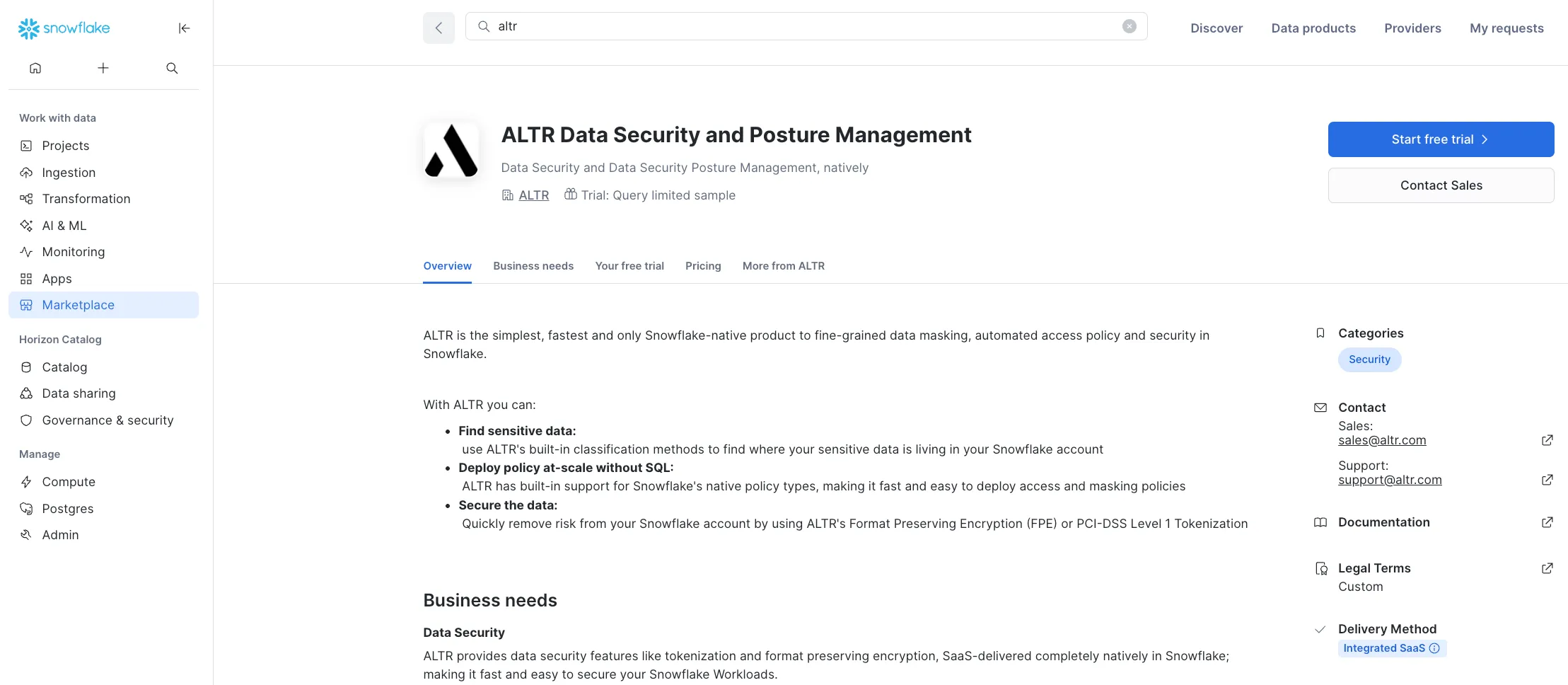
ALTR sends you an email to create your ALTR account, set your ALTR password, and start onboarding. Your ALTR username defaults to your email address and your Two-Factor Authentication method defaults to “email.”
Grant Privileges
Section titled “Grant Privileges”When you create an ALTR account through Snowflake Marketplace, required Snowflake objects are created. Once your account is created, run the SETUP_ALTR_SERVICE_ACCOUNT stored procedure.
ALTR’s Service user must have access to a Snowflake role with the appropriate privileges to enforce access governance and security. ALTR operates using the default role on the Snowflake Service user unless the default is explicitly overridden when connecting a Snowflake data source .
For ALTR accounts created from Snowflake Marketplace, the PC_ALTR_USER is automatically assigned the default role PC_ALTR_ROLE.
When using Snowflake Marketplace, there are two ways to grant ALTR the necessary privileges :
- Express Configuration (recommended)— Give ALTR privileges to run as ACCOUNTADMIN and the ALTR onboarding wizard runs the required stored procedure. Once onboarding is complete, you can revoke the ACCOUNTADMIN access.
- Manual Configuration— Manually run the required stored procedure since it must be run as an ACCOUNTADMIN role.
Express Configuration
Section titled “Express Configuration”With Express Configuration, grant ALTR’s service user the ACCOUNTADMIN role. ALTR uses this role to grant all of the necessary privileges to PC_ALTR_USER. Once onboarding is complete (i.e., you have successfully connected a database), you can safely revoke the ACCOUNTADMIN role from PC_ALTR_USER.
Manual Configuration
Section titled “Manual Configuration”With Manual Configuration, manually execute access to PC_ALTR_ROLE required for ALTR to create and enforce governance policies across all of your databases in Snowflake. ALTR provides a stored procedure that automates these privileges, which you will need run. ALTR then verifies the correct privileges were granted. For a list of these privileges and what ALTR uses them for, refer to Service User Privilege Requirements .
If you didn’t create your ALTR account through Snowflake Marketplace, such as if you are using ALTR through a partner, ALTR Support will gladly walk you through the onboarding process.
To have ALTR create your account:
- Contact ALTR Support with the following information:
- Company name and address
- Name, email address and phone number of the initial ALTR administrator
- Create a service user by running ALTR’s stored procedure. Learn more.